
Depositing funds into your PH35 account using the correct procedure ensures instant balance updates while guaranteeing absolute security for your financial transactions. This guide provides a step-by-step walkthrough for funding your profile, highlighting the most popular domestic payment channels in the Philippines and key precautions to keep every transaction smooth and successful.
Advantages of Depositing Funds into Your PH35 Account
The PH35 platform has optimized its payment processing systems to deliver maximum convenience for the gaming community in the Philippines:
- Integrated Domestic Payment Channels: Full native support for leading Philippine e-wallets and major commercial banks, including GCash, Maya (PayMaya), GrabPay, BDO, BPI, Metrobank, and Landbank.
- Ultra-Fast Processing Speeds: Automated verification updates and credits your personal account balance within 1 to 3 minutes.
- Enterprise Financial Security: Deploys SSL 128-bit multi-layer data encryption protocols to completely prevent card or personal account leaks.
- Zero Service Fees: Players in the Philippines incur 0% additional processing fees when depositing through official gateways.

Step-by-Step Guide to Quick PH35 Deposits via Popular Channels
To guarantee a successful initial deposit into your PH35 account, select your preferred local payment channel and follow these steps:
Depositing via GCash / Maya E-Wallets (Recommended)
E-wallets represent the most widely used payment option in the Philippines due to their instant processing speeds:
- Access the official portal link: https://ph35.com.ph/ and log in to your personal profile.
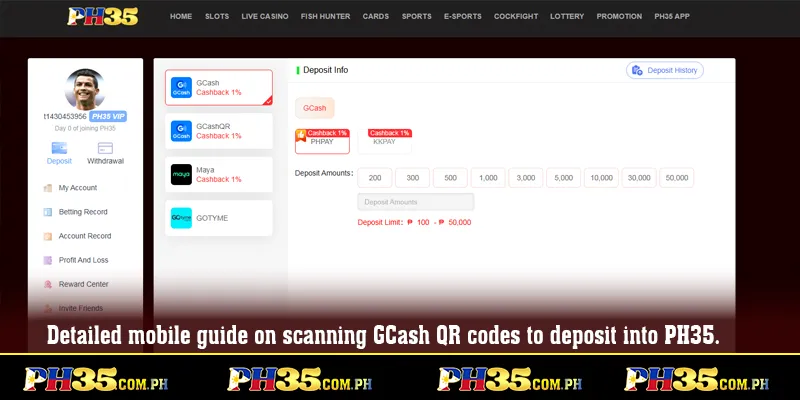
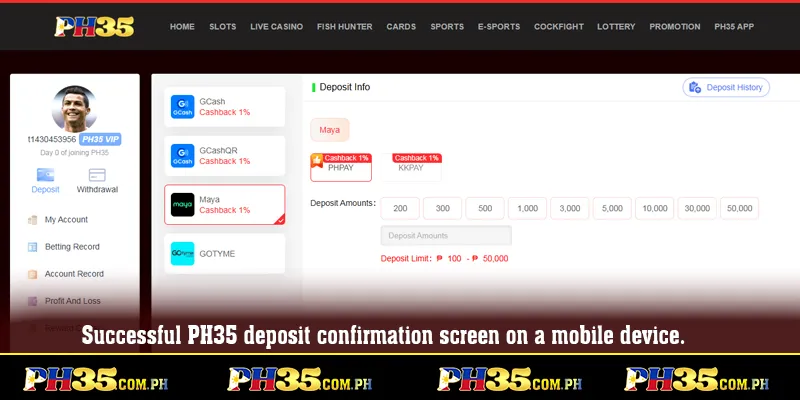
- Click “Deposit” on the main dashboard menu and select GCash or Maya.
- Enter your desired deposit amount, ensuring it meets platform minimum and maximum transaction limits.
- The system will display a unique QR code alongside receiver account details. Open your GCash or Maya app on your mobile phone, scan the QR code, or transfer the exact amount with the required reference note.
- Confirm the transfer inside your e-wallet app and wait a few seconds for your balance to update.
Depositing via Domestic Online Banking
Ideal for larger transaction amounts processed through BDO, BPI, Metrobank, or Landbank:
- Navigate to the PH35 deposit dashboard and select “Online Banking / Bank Transfer”.
- Choose your specific Philippine bank to generate the active merchant account details.
- Open your mobile online banking app and execute the transfer to the displayed details.
- Capture a screenshot of the successful transaction receipt and upload it to the portal for instant verification and balance crediting.
Mandatory Requirements for Approved PH35 Deposits
To prevent processing delays or technical glitches during your deposit request on PH35, players in the Philippines must follow these guidelines:
- Matching Account Credentials: The registered account name on your bank or GCash/Maya app must match your official PH35 registered profile name exactly.
- Adhering to Limits: Ensure each transaction falls strictly within the minimum and maximum threshold limits specified by the selected gateway.
- Retaining Transaction Proof: Always save a screenshot of the successful transaction receipt or reference number (Ref No. / Transaction ID) for verification if support is needed.
- Single-Use QR Codes: Generated QR codes and receiver account details are valid for 01 single transaction only. Never transfer funds to previously saved receiver information.
Troubleshooting Common Deposit Anomalies
During occasional local network downtime or bank maintenance windows in the Philippines, deposit processing may take slightly longer than expected. Use these quick solutions:
Funds Not Credited After 10 Minutes
- Check your GCash/Maya or bank transaction history to verify that the funds were deducted successfully.
- Verify that you did not omit the required transaction note or input an incorrect amount.
- Prepare your screenshot receipt and contact 24/7 Customer Support via Live Chat for manual crediting.
Accidental Transfers to Outdated Account Details
- If you accidentally send funds to an expired receiver account, contact Customer Support immediately with your receipt so the finance department can trace the transfer.
Conclusion
The PH35 deposit system is engineered specifically for the Philippine market, offering rapid processing, diverse local payment options, and enterprise security. Following this guide ensures full control over your capital as you explore the platform’s entertainment offerings.
Visit the official PH35 portal today, choose your preferred payment channel, and fund your account to claim your exclusive newcomer welcome rewards!