Converting your entertainment rewards and safely withdrawing your bonus funds into your personal account remains a top priority for online users. The PH35 withdrawal system is fully optimized with automated processing, connecting directly with reputable domestic payment channels in the Philippines to execute every transaction rapidly. This guide provides a step-by-step walkthrough, outlining mandatory eligibility requirements and critical security precautions to ensure a smooth, successful payout.
Standout Advantages of PH35 Withdrawals
The PH35 platform has engineered its payout infrastructure to satisfy strict security and speed benchmarks tailored for the Philippine market:
- Integrated National Payment Channels: Supports direct payouts to premier e-wallets across the Philippines—including GCash and Maya (PayMaya)—alongside major domestic commercial banks such as BDO, BPI, Metrobank, and Landbank.
- Ultra-Fast Processing Speeds: Powered by automated approval algorithms, your cash-out rewards transfer directly into your personal e-wallet or bank account within 3 to 5 minutes.
- Maximum Transaction Security: Deploys enterprise-grade SSL 128-bit data encryption protocols alongside mandatory Security PIN verification to prevent unauthorized account access.
- Zero Processing Fees: Players in the Philippines enjoy 100% free cash-out services for all transactions meeting platform turnover standards.

Step-by-Step Guide to Executing a PH35 Withdrawal in 3 Steps
To ensure your PH35 cash-out request receives instant automated approval on your initial attempt, follow this 3-step procedure:
Step 1: Log In and Link Your Payout Method
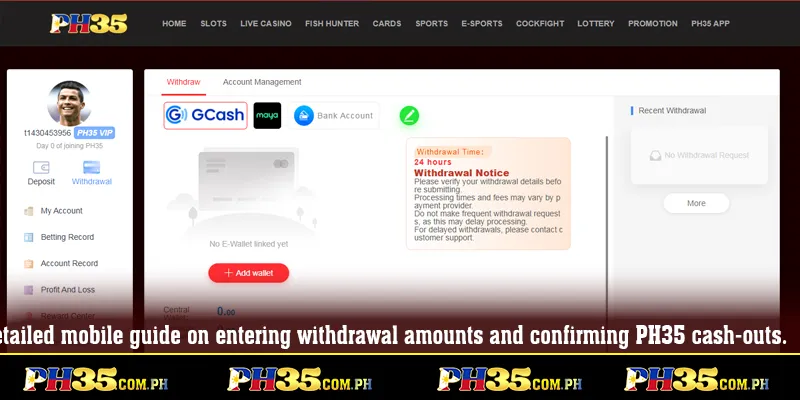
Navigate to the official portal link: https://ph35.com.ph/ and log in to your personal account. Select the “Withdrawal” option on the main account dashboard. If performing a payout for the first time, link your verified receiving account (your personal GCash, Maya, or Philippine bank account).
Step 2: Input Cash-Out Amount and Security PIN
Enter your desired cash-out amount, ensuring it falls within the platform’s minimum and maximum withdrawal limits. Next, enter your pre-set transaction password (Security PIN) to confirm account ownership.
Step 3: Confirm Request and Finalize Cash-Out
Review the receiving account details and withdrawal amount for accuracy. Click “Confirm Withdrawal” to submit your payout request. The finance department will verify and disburse your funds within minutes.
Mandatory Eligibility Requirements for Successful PH35 Withdrawals
To prevent your cash-out request from being delayed or rejected, players in the Philippines must satisfy the following criteria:
- Matching Account Credentials: The registered account name on your receiving bank or GCash/Maya e-wallet must match your official PH35 registered profile name exactly.
- Completed Turnover Requirements: If you claimed newcomer welcome packs or deposit bonus promotions, verify that you have satisfied all mandatory wagering turnover multipliers before submitting a cash-out request.
- Sufficient Account Balance: Your available balance must meet the platform’s minimum single-transaction withdrawal threshold in the Philippines.
- Daily Withdrawal Limits: Ensure your request does not exceed daily transaction frequency caps or maximum withdrawal allowances specified for your VIP tier.
Essential Precautions to Prevent Cash-Out Delays
During payout processing, users may occasionally encounter minor network interruptions. Keep the following troubleshooting tips in mind:
- Avoid Routine Bank Maintenance Windows: Refrain from placing cash-out requests during scheduled maintenance hours for major Philippine banks (such as BDO or BPI).
- Avoid Immediate Profile Edits: Modifying your registered mobile number or payout details immediately before requesting a withdrawal may trigger safety security holds for identity verification.
- Contact 24/7 Customer Support: If your funds do not reflect in your account after 15 minutes, capture a screenshot of your withdrawal transaction log and contact Live Support for immediate assistance.
Conclusion
The PH35 withdrawal process is engineered to be modern, secure, and fully aligned with local digital payment habits in the Philippines. In just a few simple steps, you can transfer your winnings smoothly into your personal e-wallet or bank account.
Click the official PH35 homepage link today to inspect your balance, manage your profile, and execute your secure cash-out request!